Process Concept
- A process is a program in execution.
- A process is the unit of work in the operating system.
- A process will need certain resources to accomplish its task
- CPU time
- memory
- files
- I/O devices
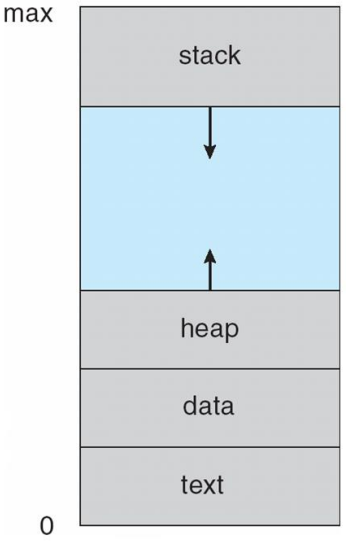
Memory Layout of a Process
- Text section: the executable code
- Data section: global variables
- Heap section: memory that is dynamically allocated during program run time
- Stack section: temporary data storage when invoking functions such as function parameters, return addresses, and local variables
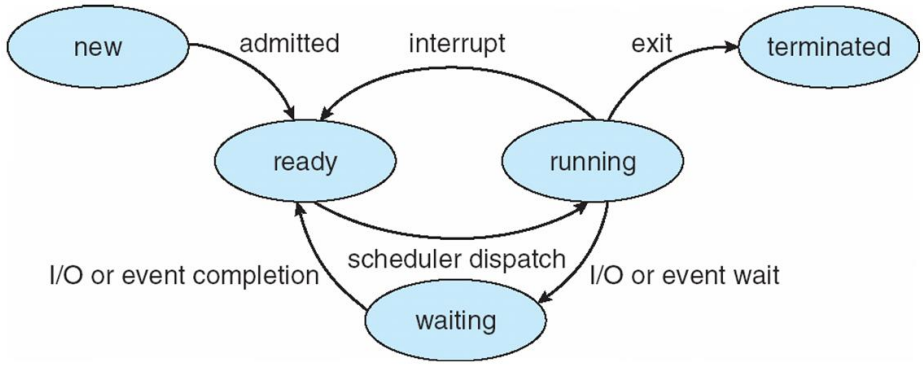
State of Process New: the process is being created.
- New: The process is being created.
- Running: Instructions are being executed.
- Waiting: The process is waiting for some event to occur.
- such as an I/O completion or reception of a signal.
- Ready: The process is waiting to be assigned to a processor.
- Terminated: The process has finished execution.
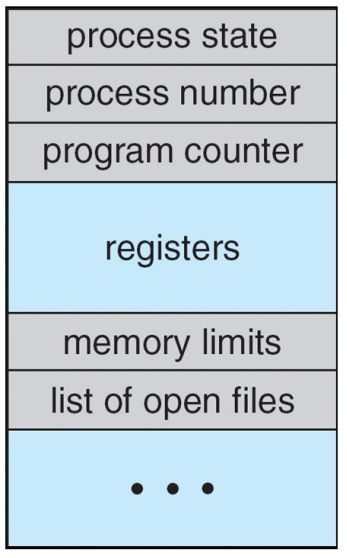
Process Control Block
- Each process is represented in the operating system by the PCB.
- A PCB contains many pieces of information associated with a specific process:
- Process state
- Program counter
- CPU registers
- CPU-scheduling information
- Memory-management information
- Accounting information
- I/O status information
Summary
- Typically, a process is a program that performs a single thread of execution.
- The single thread of control allows the process to perform only one task at a time.
- Modern operating systems have extended the process concept to allow a process to have multiple threads of execution and thus to perform more than one task at a time.
- A thread is a lightweight process.
Process Scheduling
The objective of multiprogramming is
- to have some process running at all times
- so as to maximize CPU utilization.
The objective of time sharing is
- to switch a CPU core among processes so frequently
- that users can interact with each program while it is running.
Scheduling Queue
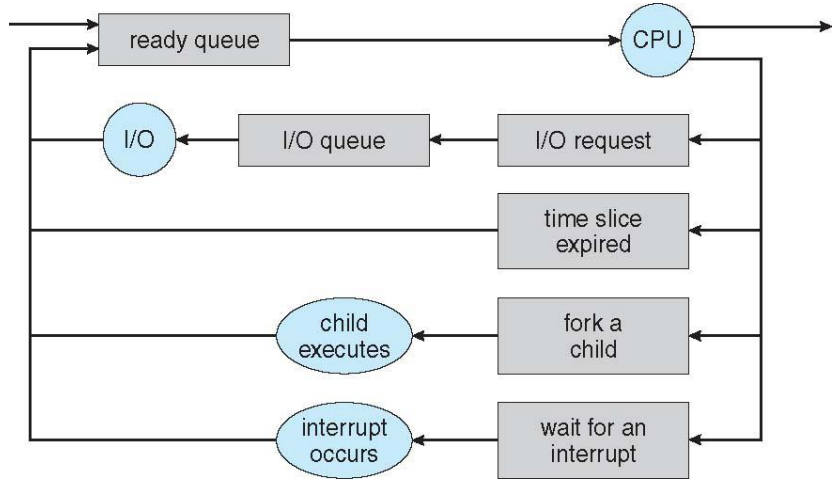
- As processes enter the system, they are put into a ready queue
- where they are ready and waiting to execute on a CPU's core.
- Processes that are waiting for a certain event to occur
- are placed in a wait queue.
- These queues are generally implemented
- in the linked lists of PCBs.
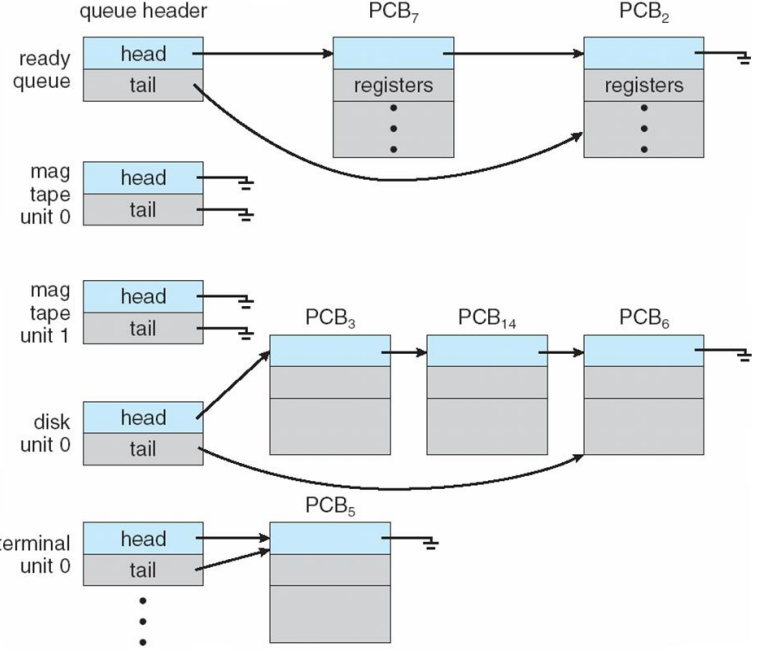
- Queueing Diagram
- as a common represemtation of process scheduling.
Context Switch
- The context of a process is represented in the PCB.
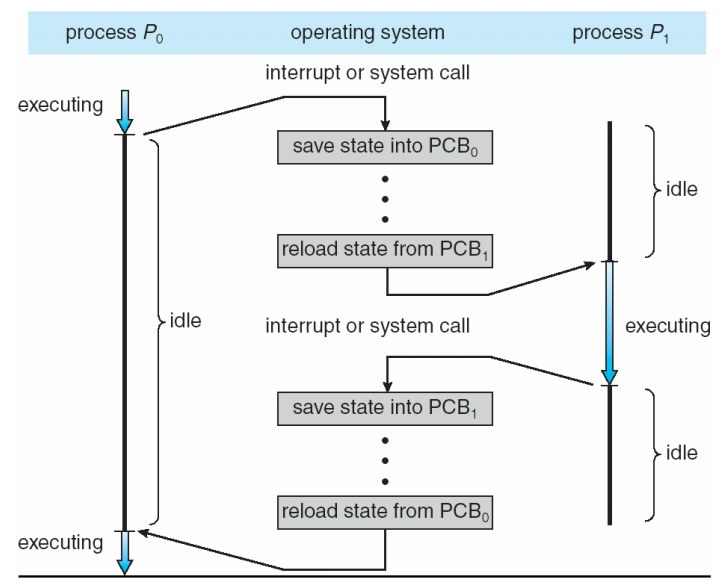
- When an interrupt occurs, the system saves the current context of the running process, so that, later, it can restore that context when it should be resumed.
- The context switch is a task that
- switches the CPU core to another process.
- performs a state save of the current process
- and a state restore of a different process.
Operations on Processes
- An operating system must provide a mechanism for process creation, and process termination.
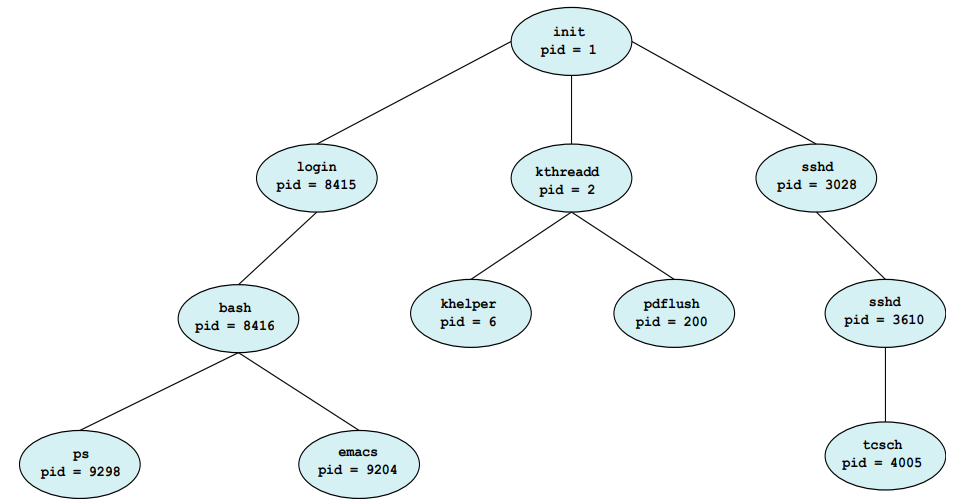
- A process may create several new processes
- the creating process: a parent process
- a newly created process: a child process
- Two possibilities for execution
- The parent continues to execute concurrently with its children
- The parent waits until some or all of its children have terminated
- Two possibilities of address-space
- The child process is a duplicate of the parent process.
- The child process has a new program loaded into it
#include <stdio.h>
#include <unistd.h>
#include <wait.h>

int main()
{
    pid_t pid;
    // fork a child process
    pid = fork();
    if (pid < 0) { // error occurred
        fprintf(stderr, "Fork Failed");
        return 1;
    }
    else if (pid == 0) { // child process
        execlp("/bin/ls", "ls", NULL);
    }
    else { // parent process
        wait(NULL);
        printf("Child Complete");
    }
    return 0;
}

- A process terminates
- when it finishes executing its final statement
- exit() system call: asks OS to delete it
- OS deallocates and reclaims all the resources: allocated memories, open files, and I/O buffers, etc
Zombie and Orphan
- zombie process: a process that has terminated, but whose parent has not yet called wait().
- orphan process: a process that has a parent process who did not invoke wait() and instead terminated
- Daemon process 또는 Background process에 활용
Operations on Processes
- In UNIX-like O/S, a new process is created by the fork() system call.
- The child process consists of a copy of the address space of the parent process.
- Both processes continue execution at the instruction after the fork() system call.
- With one difference: the return code for the fork() is zero for the child process, whereas the nonzero pid of the child is returned to the parent process.
#include <stdio.h>
#include <unistd.h>

int main()
{
    pid_t pid;
    pid = fork();
    printf("Hello, Process! %d\n", pid)

    return 0;
}
- After a fork() system call,
- the parent can continue its execution; or
- if it has nothing else to do while the child runs,
- it can issue a wait() system call to move itself off the ready queue until the termination of the child.
#include <stdio.h>
#include <unistd.h>
#include <wait.h>

int value = 5;

int main()
{
    pid_t pid;
    pid = fork();

    if (pid == 0) { // child process
        value += 15;
        return 0;
    }
    else if(pid > 0) { // parent process
        wait(NULL);
        printf("Parent: value = %d\n", value); // will be 5
    }

    return 0;
}
- fork()를 하면 parent의 내용을 복사하여 child를 생성
- parent가 wait이 되면, child가 진행되면서 child 영역내의 value를 5 증가시키고 return
- 그러나, 2.의 결과는 parent 영역의 value에 영향을 못 줌
- 따라서, parent가 다시 실행되면서 print를 할 때, 5를 출력하는 것
#include <stdio.h>
#include <unistd.h>
#include <wait.h>

int main() {
    /*
    * How many processes are created?
    * it will be 8
    * e.g. 첫번째 fork()이후 생성된 child process와 parent process 둘 다 두 번째 fork()를 실행함
    */
    fork(); // fork a child process
    fork(); // fork another child process
    fork(); // and fork another

    /*
    * 이 경우는 16개
    */
    int i;
    for(i = 0; i < 4; ++i)
        fork();

    return 0;
}
int main()
{
    pit_t pid;
    pid = fork();

    if (pid == 0) { // child process
        execlp("/bin/ls", "ls", NULL);
        printf("LINE J\n"); // 실행되지 못함
    }
    else if (pid > 0) { // parent process
        wait(NULL);
        printf("Child Complete\n");
    }

    return 0;
}
/*
* B = C
*/
int main()
{
    pid_t pid, pid1;
    pid = fork();
    if (pid == 0) { // child process
        pid1 = getpid();
        printf("child: pid = %d\n", pid); // A
        printf("child: pid1 = %d\n", pid1); // B
    }
    else if (pid > 0) { // parent process
        pid1 = getpid();
        printf("parent: pid = %d\n", pid); // C
        printf("parent: pid1 = %d\n", pid1); // D
        wait(NULL);
    }

    return 0;
}
#define SIZE 5
int nums[SIZE] = {0, 1, 2, 3, 4};

int main()
{
    pid_t pid;
    int i;
    pid = fork();

    if(pid == 0) { // child process
        for (i = 0; i < SIZE; ++i) {
            nums[i] *= i;
            printf("CHILD: %d \n", nums[i]); // 0, 1, 4, 9, 16
        }
    }
    else if (pid > 0) { // parent process
        wait(NULL);
        for (i = 0; i < SIZE; ++i) {
            printf("PARENT: %d \n", nums[i]); // 0, 1, 2, 3, 4
        }
    }

    return 0;
}
Interprocess Communication
- Process executing concurrently may be either independent processes or cooperating processes.
- A process is independent
- if it does not share data with any other processes.
- A process is cooperating
- if it can affect or be affected by the other processes.
- Cleary, any processes that shares data with other processes is a cooperating process.
IPC
IPC: Inter-Process Communication
Cooperating processes require an IPC mechanism
- that will allow them to exchange data
- that is, send data to and receive data from each other.
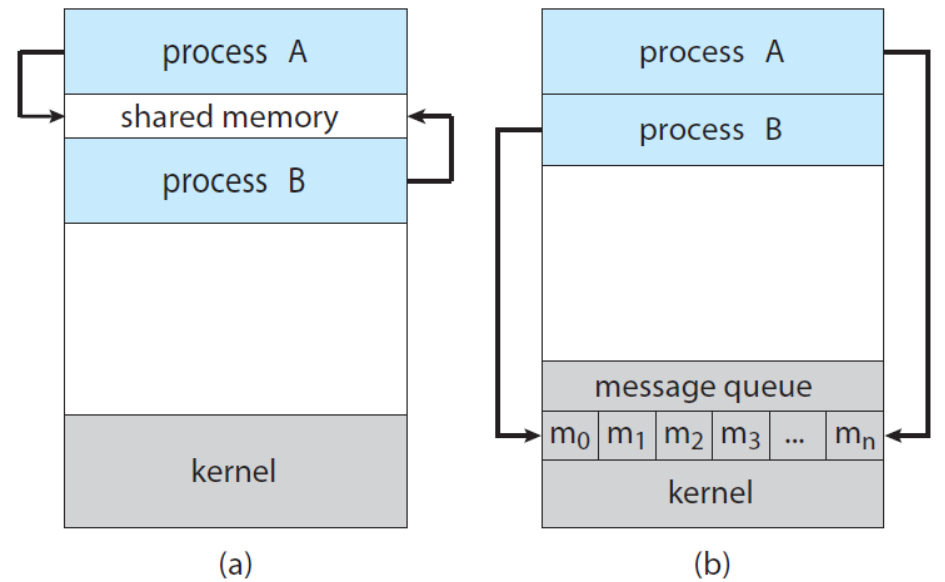
Two fundamental models of IPC
- shared memory
- message passing
IPC in Shared-Memory Systems
Consider the Producer-Consumer Problem to illustrate the concept of cooperating processes.
- a common paradigm for cooperating processes.
Producer-Consumer Problem
A producer produces information that is consumed by a consumer.
For example,
- a compiler produces assembly code, and a assembler consumes it
- a web server produces an HTML file, and a browser consumes it
A solution using shared-memory
To allow producer and consumer to run concurrently.
Let a buffer of items be available, a producer can fill the buffer, and a consumer can empty the buffer.
A shared memory is a region of memory that is shared by the producer and consumer processes.
/*
* define a shared buffer
*/
#define BUFFER_SIZE 10

typedef struct {
    ...
} item;

item buffer[BUFFER_SIZE];
int in = 0;
int out = 0;

/*
* producer process using shared memory
*/
item next_produced;

while (true) {
    /* produce an item in next_produced */

    while (((in + 1) % BUFFER_SIZE) == out); // do nothing

    buffer[in] = next_produced;
    in = (in + 1) % BUFFER_SIZE;
}

/*
* consumer process using shared memory
*/
item next_consumed;

while (true) {
    while (in == out); // do nothing

    next_consumed = buffer[out];
    out = (out + 1) % BUFFER_SIZE;
}
IPC in Message-Passing Systems
The scheme of using shared-memory requires that these processes share a region of memory and that the code for accessing and manipulating the shared memory
- be written explicitly by the application programmer
Message-Passing: OS provides the means for cooperating processes to communicate with each other via a message-passing facility.
Two operations of the message-passing facility
- send(message)
- receive(message)
/*
* producer process using message passing
*/
message next_produced;

while (true) {
    /* produce an item in next_produced */

    send(next_produced);
}

/*
* consumer process using message passing
*/
message next_consumed;

while (true) {
    receive(next_consumed);

    /* consume the item in next_consumed */
}
Communication Links
- if two processes 𝑃 and 𝑄 want to communicate,
- the must send to and receive messages from each other
- This comm. link can be implemented in a variety of ways.
- direct or indirect communication
- synchronous and asynchronous communication
- automatic or explicit buffering
- if two processes 𝑃 and 𝑄 want to communicate,
Under direct communication, each process that wants to communicate must explicitly name the recipient or sender of the communication.
The primitives of this scheme
- send(𝑃, message) – send a message to process 𝑃.
- receive(𝑄, message) – receive a message from process 𝑄
The properties of communication links in this scheme
- Links are established automatically
- A link is associated with exactly two processes
- There exists exactly one link between each pair of processes
With indirect communication, the messages are sent to and received from mailboxes, or ports.
A mailbox (also referred to as ports) can be viewed abstractly as an object into which messages can be placed by processes, and from which messages can be removed.
The primitives of this scheme
- send(𝐴, message) – send a message to mailbox 𝐴.
- receive(𝐴, message) – receive a message from mailbox 𝐴
The properties of communication links in this scheme
- Links are established between a pair of processes only if both members of the pair have a shared mailbox.
- A link may be associated with more than two processes.
- A number of different links may exist, between each pair of processes with each link corresponding to one mailbox.
OS provides a mechanism that allows a process to do:
- Create a new mailbox.
- Send and Receive messages through the mailbox.
- Delete a mailbox.
Different design options for implementation
- blocking or non-blocking: synchronous or asynchronous -> 엄밀히는 서로 구분되는 개념
- Blocking send: the sender is blocked until the message is received.
- Non-blocking send: the sender is sends the message and continue.
- Blocking receive: the receiver blocks until a message is available.
- Non-blocking receive: the receiver retrieves either a valid message or a null message.
Examples of IPC Systems
- Shared Memory: POSIX Shared Memory
- POSIX: Portable Operating System Interface (for uniX)
- Message Passing: Pipes
- One of the earliest IPC mechanisms on UNIX systems.
POSIX Shared Memory
- POSIX shared memory is organized using memory-mapped files, which associate the region of shared memory with a file.
- First, create a shared-memory object
- fd = shm_open(name, O_CREAT | ORDWR, 0666);
- Configure the size of the object in bytes
- ftruncate(fd, 4096);
- Finally, establish a memory-mapped file
- mmap(0, SIZE, PROT_READ | PROT_WRITE, MAP_SHARED, fd, 0);
/*
* Producer process illustrating POSIX shared-memory API
*/

#include <stdio.h>
#include <stdlib.h>
#include <string.h>
#include <fcntl.h>
#include <sys/shm.h>
#include <sys/stat.h>
#include <sys/mman.h>

int main()
{
    const int SIZE = 4096; // the size of shared memory
    const char *name = "OS"; // the name of shared memory
    const char *message_0 = "Hello, ";
    const char *message_1 = "Shared Memory!\n";

    int shm_fd; // the file descriptor of shared memory
    char *ptr; // pointer to shared memory

    /* create the shared memory object */
    shm_fd = shm_open(name, O_CREAT | O_RDWR, 0666);

    /* configure the size of the shared memory */
    ftruncate(shm_fd, SIZE);

    /* map the shared memory object */
    ptr = (char *)mmap(0, SIZE, PROT_READ | PROT_WRITE, MAP_SHARED, shm_fd, 0);

    /* write to the shared memory */
    sprintf(ptr, "%s", message_0);
    ptr += strlen(message_0);
    sprintf(ptr, "%s", message_1);
    ptr += strlen(message_1);

    return 0;
}
/*
* Consumer process illustrating POSIX shared-memory API
*/

#include <stdio.h>
#include <stdlib.h>
#include <fcntl.h>
#include <sys/shm.h>
#include <sys/stat.h>
#include <sys/mman.h>

int main()
{
    const int SIZE = 4096; // the size of shared memory
    const char *name = "OS"; // the name of shared memory

    int shm_fd; // the file descriptor of shared memory
    char *ptr; // pointer to shared memory

    /* create the shared memory object */
    shm_fd = shm_open(name, O_RDONLY, 0666);

    /* map the shared memory object */
    ptr = (char *)mmap(0, SIZE, PROT_READ | PROT_WRITE, MAP_SHARED, shm_fd, 0);

    /* read from the shared memory object */
    printf("%s", (char *)ptr);

    /* remove the shared memory */
    shm_unlink(name);

    return 0;
}
Pipes
Pipes were one of the first IPC mechanisms in early UNIX systems.
A pipe acts as a conduit allowing two processes to communicate.
Four issues of pipe implementation
- Does the pipe allow unidirectional or bidirectional communication?
- In the case of two-way comm., is it half-duplex or full-duplex?
- Must a relationship exist between the communicating process?
- such as parent-child
- Can the pipes communicate over a network?
Two common types of pipes
- Ordinary pipes
- cannot be accessed from outside the process that created it.
- Typically, a parent process creates a pipe and uses it to communicate with a child process that it created.
- Named pipes
- can be accessed without a parent-child relationship
- Ordinary pipes
Ordinary Pipes
- Ordinary pipes allow two processes to communicate in producer-consumer fashion.
- the producer writes to one end of the pipe (write end)
- the consumer reads from the other end (read end)
- unidirectional: only one-way communication is possible.
- two-way communication? use two pipes!
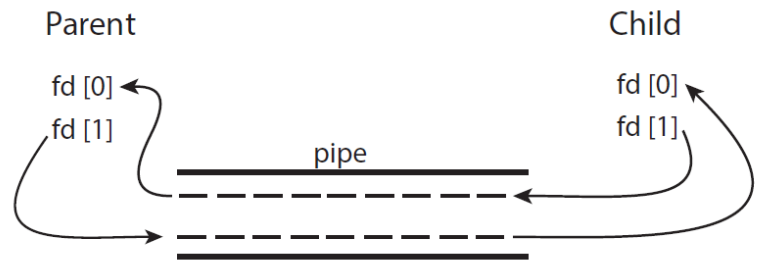
- On UNIX systems, ordinary pipes are constructed using the function:
- pipe(int fd[])
- fd[0]: the read end of the pipe
- fd[1]: the write end
/*
* Ordinary pipe in UNIX
*/

#include <stdio.h>
#include <string.h>
#include <unistd.h>
#include <sys/types.h>

#define BUFFER_SIZE 25
#define READ_END 0
#define WRITE_END 1

int main()
{
    char write_msg[BUFFER_SIZE] = "Greetings;
    char read_msg[BUFFER_SIZE];
    int fd[2];
    pid_t pid;

    /* create the pipe */
    pipe(fd);

    pid = fork(); // fork a new process

    if (pid > 0) { // parent process
        close(fd[READ_END]);
        /* write to the pipe */
        write(fd[WRITE_END], write_msg, strlen(write_msg) + 1);
        close(fd[WRITE_END]);
    }
    else if (pid == 0) { // child process
        close(fd[WRITE_END]);
        /* read to the pipe */
        read(fd[READ_END], read_msg, BUFFER_SIZE);
        printf("read %s\n", read_msg);
        close(fd[READ_END]);
    }

    return 0;
}
Communication in Client-Server Systems
- Two other strategies in client-server systems
- Sockets are defined as endpoints for communication.
- RPCs (Remote Procedure Calls) abstracts procedure calls between processes on networked systems.
Socket
A socket is identified by an IP address concatenated with a port number.
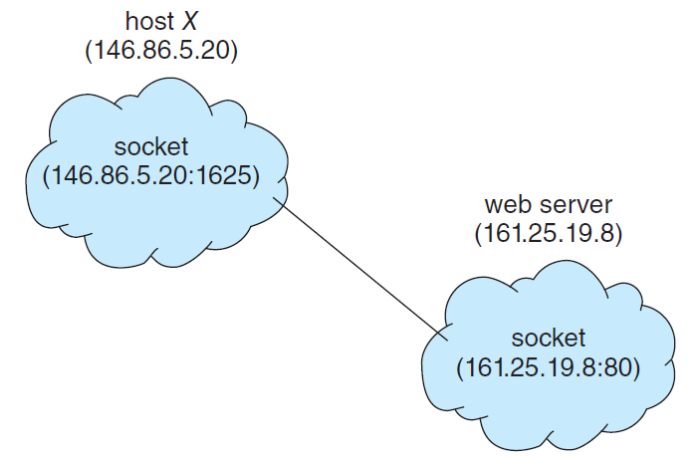
- Java provides a much easier interface to sockets and provides three different types of sockets.
- Socket class: connection-oriented (TCP)
- DatagramSocket class: connectionless (UDP)
- MulticastSocket class: multiple recipients
/*
* Date server in Java
*/

import java.net.*;
import java.io.*;

public class DateServer {
    public static void main(String[] args) throws Exception {
        ServerSocket server = new ServerSocket(6013);

        /* Now listen for connections */
        while (true) {
        Socket client = server.accept();
        PrintWriter pout = new PrintWriter(client.getOutputStream(), true);

        /* write the Date to the socket */
        pout.println(new java.util.Date().toString());

        /* close the socket and resume listening for connections */
        client.close();
        }
    }
}
/*
* Date client in Java
*/

import java.net.*;
import java.io.*;

public class DateClient {
    public static void main(String[] args) throws Exception {
        /* make connection to server socket */
        Socket socket = new Socket("127.0.0.1", 6013);

        InputStream in = socket.getInputStream();
        BufferedReader br = new BufferedReader(new InputStreamReader(in));

        /* read date from the socket */
        String line = null;

        while ((line = br.readLine()) != null)
            System.out.println(line);

        /* close the socket connections */
        socket.close();
    }
}
RPC
One of the most common forms of remote service.
Designed as a way to abstract the procedure-call mechanism for use between systems with network connections.
A client invokes a procedure on a remote host as it would invoke a procedure locally.
The RPC system hides the details that allow communication to take place by providing a stub on the client side.
The stub of client-side locates the server and marshals the parameters.
The stub of server-side received this message, unpacks the marshalled parameters, and performs the procedure on the server.